Sequro GuardPro Wireless Surveillance Security Camera System is available in Saudi Arabia.
Find out all you need to know about Sequro GuardPro Wireless Surveillance Security Camera System before buying : Price, Test video, Datasheet, Similar products.
Sequro GuardPro Wireless Surveillance Security Camera System – Features & Prices in Saudi Arabia :
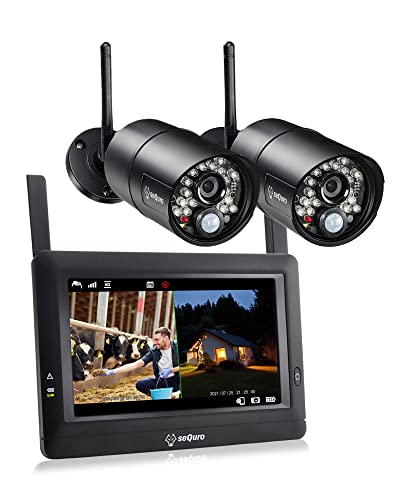
Sequro GuardPro Wireless Surveillance Security Camera System with Monitor, Weatherproof Outdoor Night Vision HD AC-Powered Camera and Home Surveillance 4CH Monitor DVR 2-cam Kit Black
Product Dimensions
10.63 x 4.92 x 11.42 inches
Item Weight
5 pounds
ASIN
B072J7QNPL
Item model number
8593
Batteries
1 Lithium Polymer batteries required.
Is Discontinued By Manufacturer
No
Date First Available
May 22, 2017
Manufacturer
sequro
Test video – Sequro GuardPro Wireless Surveillance Security Camera System :
Product highlights :
✔Home DIY Surveillance System, Plug-and-Play NVR, DVR, CCTV – In place the cameras, power up and job done. Note: The wireless camera unit requires AC-powered, non-battery cam.
✔Remote Access & Live Video Viewing via Internet – With built-in rechargeable battery, carry your monitor anywhere you desire. Monitor anytime, anywhere with free Sequro Smartphone App on iOS or Android. Store your recording in SD card (card not included)
✔Portable All-in-One Touch Screen Network Monitor – Handy, User friendly interface, Motion/Scheduled/Manual Recording, Instant playback videos and Live view (IP connected) in one screen
✔Long Transmission Range – Exceptionally long wireless transmission range up to 1,000 ft by line-of-sight in open area. In a residential unit with disturbances, antenna extension (5 dBi, 5 ft, 2.4 GHz, SMA Male) for the camera is recommended to avoid obstacles and to extend the range.
✔PIR sensor Built-in Camera – Built-in motion detection sensor with adjustable sensitivity settings to avoid false alarm and save memory space. Crystal clear night vision visibility ensures footages
Questions & Answers – Sequro GuardPro Wireless Surveillance Security Camera System :
➕ What is the price of Sequro GuardPro Wireless Surveillance Security Camera System in Saudi Arabia ?
The price of Sequro GuardPro Wireless Surveillance Security Camera System in-store is 780 SAR VAT.
➕ When Sequro GuardPro Wireless Surveillance Security Camera System was released ?
The release date was May 22, 2017.
➕ What is the price of Sequro GuardPro Wireless Surveillance Security Camera System cheap used ?
The price of Sequro GuardPro Wireless Surveillance Security Camera System used is 540 SAR VAT.
➕ What are the main characteristics of Sequro GuardPro Wireless Surveillance Security Camera System ?
Special specifications :
✔Home DIY Surveillance System, Plug-and-Play NVR, DVR, CCTV – In place the cameras, power up and job done. Note: The wireless camera unit requires AC-powered, non-battery cam.
➕ Is it interesting to buy this product ?
The best people who can answer you are customers who have already bought and tested this product (See Customer Reviews). This product is rated 3.9 / 5 on Amazon.
➕ Where to buy Sequro GuardPro Wireless Surveillance Security Camera System in Saudi Arabia ?
Technical specifications – Sequro GuardPro Wireless Surveillance Security Camera System :
Recommended Uses For Product
Local recording, night vision, alert, remote viewing
Brand
Sequro
Model Name
GuardPro
Connectivity Technology
Wireless
Special Feature
Night-vision
Purchase advice :
Warranty :
Check the duration of the warranty and also the faults and defects it covers. Is it complete or limited? and What is included in the warranty (parts, repairs or both)?
Shipping :
Is delivery offered? And how long does it take to get delivered (Delivery time)
Proof of purchase :
Does the shop give you an invoice ?
After-sales service :
Do they have an after-sales service to have information about the installation or operation (instructions for use). Also in case of problem, it is the seller who takes charge or you must contact the manufacturer or supplier yourself.
_____________________________
12 reviews for Sequro GuardPro Wireless Surveillance Security Camera System
Rated 5 out of 5
B. A (verified owner)–
Good Unit but keep an Eye on this – Ok first unit after 2 -3 years /failed to trigger on motion/reset everything/no luck/tap screen and cameras function/ I bought new unit /put in old memory card…same thing/Hmmmmm?/I reformated memory card and guess what /unit detected motion!!!??…so bought a new memory card for old unit/now it detects motion//so if you have this problem (card full)…reformat and you should be good to go..Thanks JIM
Rated 4 out of 5
E. F (verified owner)–
App always says “connecting” but never actually connects – ***UPDATE (Several months later) With the latest update it fixed the problem with “connecting”. I can now view on my phone using the SeQuro app. It’s working as it should! Also, just a heads up, these cameras MUST be plugged in in order to work!
Rated 4 out of 5
P. M (verified owner)–
good, not great – cameras were easy to mount and automatically paired with the included screen once they were powered. once I changed the resolution to 720p it had a crystal clear image as well (as clear as 720P can be). When you first power the cameras up they will automatically be set to 480P resolution. The motion activation and night vision work ok. I was unable to find the difference between the three motion settings. I have both cameras set to always record 24/7 on the 256 gig SD card i purchased for this system (you will NEED to purchase one separately). The two main reasons this systems gets 4 out of 5 stars are: 1. video feed is not 1080p and randomly adjusts between 480 and 720 and wont record when it drops from 720. 2. The range on the cameras to the included monitor is not great for me. Both cameras are mounts outside on either side of my driveway and the monitor is inside our kitchen. The cameras are only at any given time about 45 to 50 feet away from the monitor going through two walls (dry wall and insulation) and the loose signal several times a day. Sometimes they go up to three bars of reception and a moment later it will say no signal. The range is my biggest announce with this system. I do plan to continue using it and adding 1 more camera to it.
Rated 4 out of 5
P. M (verified owner)–
good, not great – cameras were easy to mount and automatically paired with the included screen once they were powered. once I changed the resolution to 720p it had a crystal clear image as well (as clear as 720P can be). When you first power the cameras up they will automatically be set to 480P resolution. The motion activation and night vision work ok. I was unable to find the difference between the three motion settings. I have both cameras set to always record 24/7 on the 256 gig SD card i purchased for this system (you will NEED to purchase one separately). The two main reasons this systems gets 4 out of 5 stars are: 1. video feed is not 1080p and randomly adjusts between 480 and 720 and wont record when it drops from 720. 2. The range on the cameras to the included monitor is not great for me. Both cameras are mounts outside on either side of my driveway and the monitor is inside our kitchen. The cameras are only at any given time about 45 to 50 feet away from the monitor going through two walls (dry wall and insulation) and the loose signal several times a day. Sometimes they go up to three bars of reception and a moment later it will say no signal. The range is my biggest announce with this system. I do plan to continue using it and adding 1 more camera to it.
Rated 5 out of 5
O. R (verified owner)–
It’s very easy to navigate through all the functions – It’s very easy to navigate through all the functions. The fact that you can unplug it from the wall and take it to your cameras makes aiming your cameras a breeze. The picture quality is very good, and the motion detection works very well both day and night. Images are also pretty good with the night vision. Audio is always on whichever camera you choose to have it on. There’s only two things that I wish were different. One is, with the monitor on split screen, there’s a rather large border all around the images. The border does contain useful and necessary information and icons, but only half of the border is used, and the border takes up literally half of the screen size. It’s a small screen to begin with, so it would be much better if there was an improvement there. The other thing is, there is no way to turn off motion sensor recording. When I’m busy working in the area of surveillance all day, it would be nice to be able to turn off the recording function while keeping the monitoring function active. When I come in and check the monitor, there will be pages and pages of recorded videos of just me doing my thing. However, if you know that all the recordings are nothing important, then you can erase them all at once with the memory card formatting function. But if you have recordings you want saved, you’ll erase them too. These two thing are not deal breakers for me by any means. I really like the system, and would buy it again. If it lasts a long time, it’s definitely a great value, and I highly recommend it! I hope this info is helpful!
Rated 3 out of 5
K. R (verified owner)–
Easy setup, good connectivity, no cloud storage needed, but rather poor picture. – No internet required, except when you want to monitor footage and get notifications by phone. The cameras and monitor can be spaced pretty far away from each other (for me, 70-80 ft. is sufficient, so I don’t know about larger distances). Snow and little things set off the motion detectors (even at low sensitivity setting), so it doesn’t seem feasible to have notifications turned on. The camera comes with several feet of a thicker wire for the outdoors, plus a thin wire with electric plug that connects to the other wire. To connect through a wall, you will need to drill a ca. .5 inch hole. Otherwise, you can run the thin wire through a window, but then you have to hide the thick wire somehow on the outside. The worst part is poor quality of the video footage, way worse than Ring. Night vision also pretty bad. Storage requires a mini SD card. Old footage cannot be erased remotely on your phone. Overall, a pretty basic system.
Rated 3 out of 5
E. K (verified owner)–
Can no longer view camera thru sequro app – Good camera for day. Night whites out alot of stuff. Been using this over a year. Bought 4 total now. Last one will not let me view online. It was working fine for months then we go away an it stops showing online. It says cannot connect. The advanced screen won’t come up. My 2nd system I can still view so not sure what problem is. My 3rd system the camera stopped working. I contacted sequro an they suppose send out a new camera. That was 2 weeks ago no contact since from them since. So out of 3 systems 1 has a camera that won’t work an 1 will not connect to the internet now. They are at different houses. I paid $159 for 1 set and $199 for other two.. I have googled my problem with no solution to it. We had someone try to break into the house and the camera whited them out so that was NOT helpful.
Rated 5 out of 5
O. R (verified owner)–
It’s very easy to navigate through all the functions – It’s very easy to navigate through all the functions. The fact that you can unplug it from the wall and take it to your cameras makes aiming your cameras a breeze. The picture quality is very good, and the motion detection works very well both day and night. Images are also pretty good with the night vision. Audio is always on whichever camera you choose to have it on. There’s only two things that I wish were different. One is, with the monitor on split screen, there’s a rather large border all around the images. The border does contain useful and necessary information and icons, but only half of the border is used, and the border takes up literally half of the screen size. It’s a small screen to begin with, so it would be much better if there was an improvement there. The other thing is, there is no way to turn off motion sensor recording. When I’m busy working in the area of surveillance all day, it would be nice to be able to turn off the recording function while keeping the monitoring function active. When I come in and check the monitor, there will be pages and pages of recorded videos of just me doing my thing. However, if you know that all the recordings are nothing important, then you can erase them all at once with the memory card formatting function. But if you have recordings you want saved, you’ll erase them too. These two thing are not deal breakers for me by any means. I really like the system, and would buy it again. If it lasts a long time, it’s definitely a great value, and I highly recommend it! I hope this info is helpful!
Rated 4 out of 5
E. F (verified owner)–
App always says “connecting” but never actually connects – ***UPDATE (Several months later) With the latest update it fixed the problem with “connecting”. I can now view on my phone using the SeQuro app. It’s working as it should! Also, just a heads up, these cameras MUST be plugged in in order to work!
Rated 5 out of 5
B. A (verified owner)–
Good Unit but keep an Eye on this – Ok first unit after 2 -3 years /failed to trigger on motion/reset everything/no luck/tap screen and cameras function/ I bought new unit /put in old memory card…same thing/Hmmmmm?/I reformated memory card and guess what /unit detected motion!!!??…so bought a new memory card for old unit/now it detects motion//so if you have this problem (card full)…reformat and you should be good to go..Thanks JIM
Rated 3 out of 5
E. K (verified owner)–
Can no longer view camera thru sequro app – Good camera for day. Night whites out alot of stuff. Been using this over a year. Bought 4 total now. Last one will not let me view online. It was working fine for months then we go away an it stops showing online. It says cannot connect. The advanced screen won’t come up. My 2nd system I can still view so not sure what problem is. My 3rd system the camera stopped working. I contacted sequro an they suppose send out a new camera. That was 2 weeks ago no contact since from them since. So out of 3 systems 1 has a camera that won’t work an 1 will not connect to the internet now. They are at different houses. I paid $159 for 1 set and $199 for other two.. I have googled my problem with no solution to it. We had someone try to break into the house and the camera whited them out so that was NOT helpful.
Rated 3 out of 5
K. R (verified owner)–
Easy setup, good connectivity, no cloud storage needed, but rather poor picture. – No internet required, except when you want to monitor footage and get notifications by phone. The cameras and monitor can be spaced pretty far away from each other (for me, 70-80 ft. is sufficient, so I don’t know about larger distances). Snow and little things set off the motion detectors (even at low sensitivity setting), so it doesn’t seem feasible to have notifications turned on. The camera comes with several feet of a thicker wire for the outdoors, plus a thin wire with electric plug that connects to the other wire. To connect through a wall, you will need to drill a ca. .5 inch hole. Otherwise, you can run the thin wire through a window, but then you have to hide the thick wire somehow on the outside. The worst part is poor quality of the video footage, way worse than Ring. Night vision also pretty bad. Storage requires a mini SD card. Old footage cannot be erased remotely on your phone. Overall, a pretty basic system.


![4K Digital Camera for Photography and Video [Autofocus & Anti-Shake] 48MP Vlogging Camera with SD Card](/wp-content/uploads/2023/05/51gL9sfh9NL-300x225.jpg)
B. A (verified owner) –
Good Unit but keep an Eye on this – Ok first unit after 2 -3 years /failed to trigger on motion/reset everything/no luck/tap screen and cameras function/ I bought new unit /put in old memory card…same thing/Hmmmmm?/I reformated memory card and guess what /unit detected motion!!!??…so bought a new memory card for old unit/now it detects motion//so if you have this problem (card full)…reformat and you should be good to go..Thanks JIM
E. F (verified owner) –
App always says “connecting” but never actually connects – ***UPDATE (Several months later) With the latest update it fixed the problem with “connecting”. I can now view on my phone using the SeQuro app. It’s working as it should! Also, just a heads up, these cameras MUST be plugged in in order to work!
P. M (verified owner) –
good, not great – cameras were easy to mount and automatically paired with the included screen once they were powered. once I changed the resolution to 720p it had a crystal clear image as well (as clear as 720P can be). When you first power the cameras up they will automatically be set to 480P resolution. The motion activation and night vision work ok. I was unable to find the difference between the three motion settings. I have both cameras set to always record 24/7 on the 256 gig SD card i purchased for this system (you will NEED to purchase one separately). The two main reasons this systems gets 4 out of 5 stars are: 1. video feed is not 1080p and randomly adjusts between 480 and 720 and wont record when it drops from 720. 2. The range on the cameras to the included monitor is not great for me. Both cameras are mounts outside on either side of my driveway and the monitor is inside our kitchen. The cameras are only at any given time about 45 to 50 feet away from the monitor going through two walls (dry wall and insulation) and the loose signal several times a day. Sometimes they go up to three bars of reception and a moment later it will say no signal. The range is my biggest announce with this system. I do plan to continue using it and adding 1 more camera to it.
P. M (verified owner) –
good, not great – cameras were easy to mount and automatically paired with the included screen once they were powered. once I changed the resolution to 720p it had a crystal clear image as well (as clear as 720P can be). When you first power the cameras up they will automatically be set to 480P resolution. The motion activation and night vision work ok. I was unable to find the difference between the three motion settings. I have both cameras set to always record 24/7 on the 256 gig SD card i purchased for this system (you will NEED to purchase one separately). The two main reasons this systems gets 4 out of 5 stars are: 1. video feed is not 1080p and randomly adjusts between 480 and 720 and wont record when it drops from 720. 2. The range on the cameras to the included monitor is not great for me. Both cameras are mounts outside on either side of my driveway and the monitor is inside our kitchen. The cameras are only at any given time about 45 to 50 feet away from the monitor going through two walls (dry wall and insulation) and the loose signal several times a day. Sometimes they go up to three bars of reception and a moment later it will say no signal. The range is my biggest announce with this system. I do plan to continue using it and adding 1 more camera to it.
O. R (verified owner) –
It’s very easy to navigate through all the functions – It’s very easy to navigate through all the functions. The fact that you can unplug it from the wall and take it to your cameras makes aiming your cameras a breeze. The picture quality is very good, and the motion detection works very well both day and night. Images are also pretty good with the night vision. Audio is always on whichever camera you choose to have it on. There’s only two things that I wish were different. One is, with the monitor on split screen, there’s a rather large border all around the images. The border does contain useful and necessary information and icons, but only half of the border is used, and the border takes up literally half of the screen size. It’s a small screen to begin with, so it would be much better if there was an improvement there. The other thing is, there is no way to turn off motion sensor recording. When I’m busy working in the area of surveillance all day, it would be nice to be able to turn off the recording function while keeping the monitoring function active. When I come in and check the monitor, there will be pages and pages of recorded videos of just me doing my thing. However, if you know that all the recordings are nothing important, then you can erase them all at once with the memory card formatting function. But if you have recordings you want saved, you’ll erase them too. These two thing are not deal breakers for me by any means. I really like the system, and would buy it again. If it lasts a long time, it’s definitely a great value, and I highly recommend it! I hope this info is helpful!
K. R (verified owner) –
Easy setup, good connectivity, no cloud storage needed, but rather poor picture. – No internet required, except when you want to monitor footage and get notifications by phone. The cameras and monitor can be spaced pretty far away from each other (for me, 70-80 ft. is sufficient, so I don’t know about larger distances). Snow and little things set off the motion detectors (even at low sensitivity setting), so it doesn’t seem feasible to have notifications turned on. The camera comes with several feet of a thicker wire for the outdoors, plus a thin wire with electric plug that connects to the other wire. To connect through a wall, you will need to drill a ca. .5 inch hole. Otherwise, you can run the thin wire through a window, but then you have to hide the thick wire somehow on the outside. The worst part is poor quality of the video footage, way worse than Ring. Night vision also pretty bad. Storage requires a mini SD card. Old footage cannot be erased remotely on your phone. Overall, a pretty basic system.
E. K (verified owner) –
Can no longer view camera thru sequro app – Good camera for day. Night whites out alot of stuff. Been using this over a year. Bought 4 total now. Last one will not let me view online. It was working fine for months then we go away an it stops showing online. It says cannot connect. The advanced screen won’t come up. My 2nd system I can still view so not sure what problem is. My 3rd system the camera stopped working. I contacted sequro an they suppose send out a new camera. That was 2 weeks ago no contact since from them since. So out of 3 systems 1 has a camera that won’t work an 1 will not connect to the internet now. They are at different houses. I paid $159 for 1 set and $199 for other two.. I have googled my problem with no solution to it. We had someone try to break into the house and the camera whited them out so that was NOT helpful.
O. R (verified owner) –
It’s very easy to navigate through all the functions – It’s very easy to navigate through all the functions. The fact that you can unplug it from the wall and take it to your cameras makes aiming your cameras a breeze. The picture quality is very good, and the motion detection works very well both day and night. Images are also pretty good with the night vision. Audio is always on whichever camera you choose to have it on. There’s only two things that I wish were different. One is, with the monitor on split screen, there’s a rather large border all around the images. The border does contain useful and necessary information and icons, but only half of the border is used, and the border takes up literally half of the screen size. It’s a small screen to begin with, so it would be much better if there was an improvement there. The other thing is, there is no way to turn off motion sensor recording. When I’m busy working in the area of surveillance all day, it would be nice to be able to turn off the recording function while keeping the monitoring function active. When I come in and check the monitor, there will be pages and pages of recorded videos of just me doing my thing. However, if you know that all the recordings are nothing important, then you can erase them all at once with the memory card formatting function. But if you have recordings you want saved, you’ll erase them too. These two thing are not deal breakers for me by any means. I really like the system, and would buy it again. If it lasts a long time, it’s definitely a great value, and I highly recommend it! I hope this info is helpful!
E. F (verified owner) –
App always says “connecting” but never actually connects – ***UPDATE (Several months later) With the latest update it fixed the problem with “connecting”. I can now view on my phone using the SeQuro app. It’s working as it should! Also, just a heads up, these cameras MUST be plugged in in order to work!
B. A (verified owner) –
Good Unit but keep an Eye on this – Ok first unit after 2 -3 years /failed to trigger on motion/reset everything/no luck/tap screen and cameras function/ I bought new unit /put in old memory card…same thing/Hmmmmm?/I reformated memory card and guess what /unit detected motion!!!??…so bought a new memory card for old unit/now it detects motion//so if you have this problem (card full)…reformat and you should be good to go..Thanks JIM
E. K (verified owner) –
Can no longer view camera thru sequro app – Good camera for day. Night whites out alot of stuff. Been using this over a year. Bought 4 total now. Last one will not let me view online. It was working fine for months then we go away an it stops showing online. It says cannot connect. The advanced screen won’t come up. My 2nd system I can still view so not sure what problem is. My 3rd system the camera stopped working. I contacted sequro an they suppose send out a new camera. That was 2 weeks ago no contact since from them since. So out of 3 systems 1 has a camera that won’t work an 1 will not connect to the internet now. They are at different houses. I paid $159 for 1 set and $199 for other two.. I have googled my problem with no solution to it. We had someone try to break into the house and the camera whited them out so that was NOT helpful.
K. R (verified owner) –
Easy setup, good connectivity, no cloud storage needed, but rather poor picture. – No internet required, except when you want to monitor footage and get notifications by phone. The cameras and monitor can be spaced pretty far away from each other (for me, 70-80 ft. is sufficient, so I don’t know about larger distances). Snow and little things set off the motion detectors (even at low sensitivity setting), so it doesn’t seem feasible to have notifications turned on. The camera comes with several feet of a thicker wire for the outdoors, plus a thin wire with electric plug that connects to the other wire. To connect through a wall, you will need to drill a ca. .5 inch hole. Otherwise, you can run the thin wire through a window, but then you have to hide the thick wire somehow on the outside. The worst part is poor quality of the video footage, way worse than Ring. Night vision also pretty bad. Storage requires a mini SD card. Old footage cannot be erased remotely on your phone. Overall, a pretty basic system.