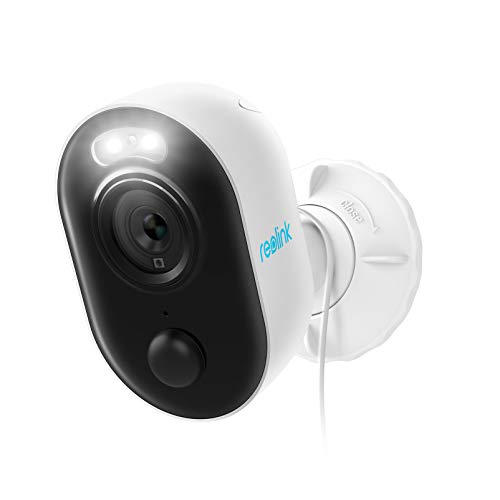
REOLINK Outdoor Security Camera with Spotlight, Lumus is available in Saudi Arabia.
Find out all you need to know about REOLINK Outdoor Security Camera with Spotlight, Lumus before buying : Price, Test video, Datasheet, Similar products.
REOLINK Outdoor Security Camera with Spotlight, Lumus – Features & Prices in Saudi Arabia :
REOLINK Outdoor Security Camera with Spotlight, Lumus 1080P HD Plug-in WiFi Camera for Home Security System, PIR Motion Detection, Two-Way Talk and Siren Alarm, Waterproof, Micro SD Card Storage
Product Dimensions
3.9 x 3.58 x 2.36 inches
Item Weight
6.5 ounces
ASIN
B08628J862
Item model number
Reolink Lumus
Date First Available
March 17, 2020
Manufacturer
Reolink Digital
Country of Origin
China
Test video – REOLINK Outdoor Security Camera with Spotlight, Lumus :
Product highlights :
COLOR NIGHT VISION: With built-in spotlights, Reolink Lumus delivers full-color videos even when there is no light source surrounded. You can see more valuable details to identify people, vehicles, and other objects at night.
PIR + MOTION DETECTION: The combination of motion detection and PIR detection has decreased false alerts significantly. Besides, you can set activity zones or adjust motion sensitivity and schedule to fit in any situation and minimize unwanted alarms.
MULTIPLE WAYS FOR ALARM: When motion is spotted, you’ll get instant alerts – push notifications on Reolink App and alert emails – to let you know someone is approaching your home. Also, its powerfully loud siren and custom voice alarm can deter intruders when in an emergency.
MULTIPLE RECORDING OPTIONS WITHOUT FEE: Insert a micro SD card (up to 128GB, not included) to save motion-triggered events, choose 24/7 continuous recording with Reolink NVR (optional), or customize scheduled recording.
TWO-YEAR WARRANTY: 2 years warranty is provided for each Reolink product and firmware maintenance will be launched on a regular basis to upgrade the function and experience.
Questions & Answers – REOLINK Outdoor Security Camera with Spotlight, Lumus :
➕ What is the price of REOLINK Outdoor Security Camera with Spotlight, Lumus in Saudi Arabia ?
The price of REOLINK Outdoor Security Camera with Spotlight, Lumus in-store is 170 SAR VAT.
➕ When REOLINK Outdoor Security Camera with Spotlight, Lumus was released ?
The release date was March 17, 2020.
➕ What is the price of REOLINK Outdoor Security Camera with Spotlight, Lumus cheap used ?
The price of REOLINK Outdoor Security Camera with Spotlight, Lumus used is 110 SAR VAT.
➕ What are the main characteristics of REOLINK Outdoor Security Camera with Spotlight, Lumus ?
Special specifications :
COLOR NIGHT VISION: With built-in spotlights, Reolink Lumus delivers full-color videos even when there is no light source surrounded. You can see more valuable details to identify people, vehicles, and other objects at night.
➕ Is it interesting to buy this product ?
The best people who can answer you are customers who have already bought and tested this product (See Customer Reviews). This product is rated 4.3 / 5 on Amazon.
➕ Where to buy REOLINK Outdoor Security Camera with Spotlight, Lumus in Saudi Arabia ?
Technical specifications – REOLINK Outdoor Security Camera with Spotlight, Lumus :
Recommended Uses For Product
Outdoor Security
Brand
REOLINK
Connectivity Technology
Plug-in 2.4GHz WiFi
Special Feature
Built-in Spotlights, 2 Way Audio, Motion Sensor
Indoor/Outdoor Usage
Outdoor
Purchase advice :
Warranty :
Check the duration of the warranty and also the faults and defects it covers. Is it complete or limited? and What is included in the warranty (parts, repairs or both)?
Shipping :
Is delivery offered? And how long does it take to get delivered (Delivery time)
Proof of purchase :
Does the shop give you an invoice ?
After-sales service :
Do they have an after-sales service to have information about the installation or operation (instructions for use). Also in case of problem, it is the seller who takes charge or you must contact the manufacturer or supplier yourself.
_____________________________
8 reviews for REOLINK Outdoor Security Camera with Spotlight, Lumus
Rated 5 out of 5
L. L (verified owner)–
Awesome Cameras – I purchased 3 of the Reolink Lumus cameras with plugs. My only issue with this camera being at the lower level is some of the options that it doesn’t have such as identifying and being able to select the type of motions to record. I record to mini sd cards in the cameras and it records over when cards are full. Overall, I am extremely pleased with my purchase. I do plan to add additional Reolink equpment.
Rated 4 out of 5
C. P (verified owner)–
Great for the price. – Don’t bother with the Argus 2. Get these instead. The motion detection/recording start is much better. The IR is better as well.
Rated 5 out of 5
L. L (verified owner)–
Awesome Cameras – I purchased 3 of the Reolink Lumus cameras with plugs. My only issue with this camera being at the lower level is some of the options that it doesn’t have such as identifying and being able to select the type of motions to record. I record to mini sd cards in the cameras and it records over when cards are full. Overall, I am extremely pleased with my purchase. I do plan to add additional Reolink equpment.
Rated 5 out of 5
C. H (verified owner)–
Easy setup, extra features, and good video quality – Update: Now that we’ve had it a minute, we’re still pleased. It is a little hiccupy on Google home, but we’re pretty ok with that. To be fair, it interrupts the music streaming to display the camera anyway, so we haven’t done it that way much at all. The notifications are usually prompt on both of our android phones. When there is a delay, I’m pretty sure it has to due with the sleep status of the phone and not with the camera, though that’s really just my theory. The picture quality is great. Being able to block sections out of the motion detection has worked nearly perfectly – the angle of the sun does affect some shadows stretching farther than what i have blocked in the morning, but I haven’t decided whether to draw over that part, leave it be, or set up times when notifications are off. It’s obviously not a big problem or I would have fixed it. So anyway, that’s the update. We haven’t needed to use the speaker or microphone, but we did test them. Neat things…you have to have the volume on your phone on to be able to hear the person! (Duh, I know. I always have mine turned off, though, so I just didn’t think about it at first). Also downloaded the PC version, which was easy to set up and streams perfectly with no hiccups. Very handy while working, since I can pull the camera up that way and not interrupt my streaming music. And the light is very bright, according to my husband, who has to leave super early in the am for work each day. 😉
Rated 5 out of 5
O. M (verified owner)–
I install Cams at offices and homes via BizACT in Silicon Valley, and I am impressed. – I (engineer) just finished running most of the initial tests on this camera and I am impressed. Well done Reolink!
Rated 4 out of 5
L. L (verified owner)–
POE cameras are more reliable than solar powered lights, i have 15 Reolink cameras – Camera’s main objective was to take single pictures of the Guest Parking, so that no one parks for extended periods (48hrs).
Rated 4 out of 5
K. N (verified owner)–
No velco strap – I would have given it a five star if it came with the Velco strap.
Rated 5 out of 5
H. S (verified owner)–
Love this brand of camera – This is the 5th Reolink camera I’ve purchased. 3 inside & 2 outside. Put them where you want, plug them into an electric outlet & use the very simple Reolink app to connect all of them.
Rated 4 out of 5
K. N (verified owner)–
No velco strap – I would have given it a five star if it came with the Velco strap.
Rated 4 out of 5
C. P (verified owner)–
Great for the price. – Don’t bother with the Argus 2. Get these instead. The motion detection/recording start is much better. The IR is better as well.
Rated 5 out of 5
H. S (verified owner)–
Love this brand of camera – This is the 5th Reolink camera I’ve purchased. 3 inside & 2 outside. Put them where you want, plug them into an electric outlet & use the very simple Reolink app to connect all of them.
Rated 4 out of 5
L. L (verified owner)–
POE cameras are more reliable than solar powered lights, i have 15 Reolink cameras – Camera’s main objective was to take single pictures of the Guest Parking, so that no one parks for extended periods (48hrs).
Rated 5 out of 5
O. M (verified owner)–
I install Cams at offices and homes via BizACT in Silicon Valley, and I am impressed. – I (engineer) just finished running most of the initial tests on this camera and I am impressed. Well done Reolink!
Rated 5 out of 5
M. S (verified owner)–
Excelente – Muy fácil de instalar increíblemente útil y versátil
Rated 5 out of 5
M. S (verified owner)–
Excelente – Muy fácil de instalar increíblemente útil y versátil
Rated 5 out of 5
C. H (verified owner)–
Easy setup, extra features, and good video quality – Update: Now that we’ve had it a minute, we’re still pleased. It is a little hiccupy on Google home, but we’re pretty ok with that. To be fair, it interrupts the music streaming to display the camera anyway, so we haven’t done it that way much at all. The notifications are usually prompt on both of our android phones. When there is a delay, I’m pretty sure it has to due with the sleep status of the phone and not with the camera, though that’s really just my theory. The picture quality is great. Being able to block sections out of the motion detection has worked nearly perfectly – the angle of the sun does affect some shadows stretching farther than what i have blocked in the morning, but I haven’t decided whether to draw over that part, leave it be, or set up times when notifications are off. It’s obviously not a big problem or I would have fixed it. So anyway, that’s the update. We haven’t needed to use the speaker or microphone, but we did test them. Neat things…you have to have the volume on your phone on to be able to hear the person! (Duh, I know. I always have mine turned off, though, so I just didn’t think about it at first). Also downloaded the PC version, which was easy to set up and streams perfectly with no hiccups. Very handy while working, since I can pull the camera up that way and not interrupt my streaming music. And the light is very bright, according to my husband, who has to leave super early in the am for work each day. 😉

![4K Digital Camera for Photography and Video [Autofocus & Anti-Shake] 48MP Vlogging Camera with SD Card](/wp-content/uploads/2023/05/51gL9sfh9NL-300x225.jpg)
L. L (verified owner) –
Awesome Cameras – I purchased 3 of the Reolink Lumus cameras with plugs. My only issue with this camera being at the lower level is some of the options that it doesn’t have such as identifying and being able to select the type of motions to record. I record to mini sd cards in the cameras and it records over when cards are full. Overall, I am extremely pleased with my purchase. I do plan to add additional Reolink equpment.
C. P (verified owner) –
Great for the price. – Don’t bother with the Argus 2. Get these instead. The motion detection/recording start is much better. The IR is better as well.
L. L (verified owner) –
Awesome Cameras – I purchased 3 of the Reolink Lumus cameras with plugs. My only issue with this camera being at the lower level is some of the options that it doesn’t have such as identifying and being able to select the type of motions to record. I record to mini sd cards in the cameras and it records over when cards are full. Overall, I am extremely pleased with my purchase. I do plan to add additional Reolink equpment.
C. H (verified owner) –
Easy setup, extra features, and good video quality – Update: Now that we’ve had it a minute, we’re still pleased. It is a little hiccupy on Google home, but we’re pretty ok with that. To be fair, it interrupts the music streaming to display the camera anyway, so we haven’t done it that way much at all. The notifications are usually prompt on both of our android phones. When there is a delay, I’m pretty sure it has to due with the sleep status of the phone and not with the camera, though that’s really just my theory. The picture quality is great. Being able to block sections out of the motion detection has worked nearly perfectly – the angle of the sun does affect some shadows stretching farther than what i have blocked in the morning, but I haven’t decided whether to draw over that part, leave it be, or set up times when notifications are off. It’s obviously not a big problem or I would have fixed it. So anyway, that’s the update. We haven’t needed to use the speaker or microphone, but we did test them. Neat things…you have to have the volume on your phone on to be able to hear the person! (Duh, I know. I always have mine turned off, though, so I just didn’t think about it at first). Also downloaded the PC version, which was easy to set up and streams perfectly with no hiccups. Very handy while working, since I can pull the camera up that way and not interrupt my streaming music. And the light is very bright, according to my husband, who has to leave super early in the am for work each day. 😉
O. M (verified owner) –
I install Cams at offices and homes via BizACT in Silicon Valley, and I am impressed. – I (engineer) just finished running most of the initial tests on this camera and I am impressed. Well done Reolink!
L. L (verified owner) –
POE cameras are more reliable than solar powered lights, i have 15 Reolink cameras – Camera’s main objective was to take single pictures of the Guest Parking, so that no one parks for extended periods (48hrs).
K. N (verified owner) –
No velco strap – I would have given it a five star if it came with the Velco strap.
H. S (verified owner) –
Love this brand of camera – This is the 5th Reolink camera I’ve purchased. 3 inside & 2 outside. Put them where you want, plug them into an electric outlet & use the very simple Reolink app to connect all of them.
K. N (verified owner) –
No velco strap – I would have given it a five star if it came with the Velco strap.
C. P (verified owner) –
Great for the price. – Don’t bother with the Argus 2. Get these instead. The motion detection/recording start is much better. The IR is better as well.
H. S (verified owner) –
Love this brand of camera – This is the 5th Reolink camera I’ve purchased. 3 inside & 2 outside. Put them where you want, plug them into an electric outlet & use the very simple Reolink app to connect all of them.
L. L (verified owner) –
POE cameras are more reliable than solar powered lights, i have 15 Reolink cameras – Camera’s main objective was to take single pictures of the Guest Parking, so that no one parks for extended periods (48hrs).
O. M (verified owner) –
I install Cams at offices and homes via BizACT in Silicon Valley, and I am impressed. – I (engineer) just finished running most of the initial tests on this camera and I am impressed. Well done Reolink!
M. S (verified owner) –
Excelente – Muy fácil de instalar increíblemente útil y versátil
M. S (verified owner) –
Excelente – Muy fácil de instalar increíblemente útil y versátil
C. H (verified owner) –
Easy setup, extra features, and good video quality – Update: Now that we’ve had it a minute, we’re still pleased. It is a little hiccupy on Google home, but we’re pretty ok with that. To be fair, it interrupts the music streaming to display the camera anyway, so we haven’t done it that way much at all. The notifications are usually prompt on both of our android phones. When there is a delay, I’m pretty sure it has to due with the sleep status of the phone and not with the camera, though that’s really just my theory. The picture quality is great. Being able to block sections out of the motion detection has worked nearly perfectly – the angle of the sun does affect some shadows stretching farther than what i have blocked in the morning, but I haven’t decided whether to draw over that part, leave it be, or set up times when notifications are off. It’s obviously not a big problem or I would have fixed it. So anyway, that’s the update. We haven’t needed to use the speaker or microphone, but we did test them. Neat things…you have to have the volume on your phone on to be able to hear the person! (Duh, I know. I always have mine turned off, though, so I just didn’t think about it at first). Also downloaded the PC version, which was easy to set up and streams perfectly with no hiccups. Very handy while working, since I can pull the camera up that way and not interrupt my streaming music. And the light is very bright, according to my husband, who has to leave super early in the am for work each day. 😉