
Description
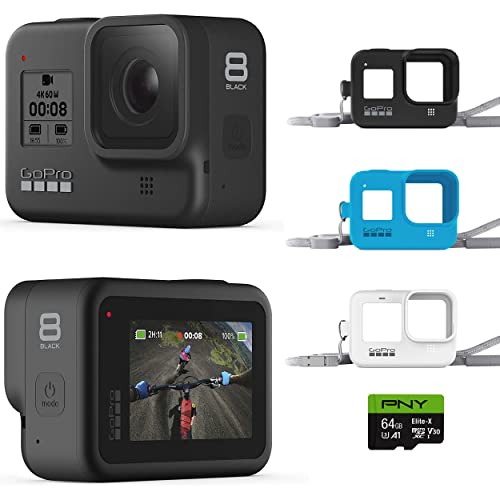
GoPro HERO8 Black + Lanyard + 64 – Features & Prices in Saudi Arabia :
GoPro HERO8 Black + Lanyard + 64 GB SD Card – E-Commerce Packaging – Waterproof Digital Action Camera with Touch Screen 4K HD Video 12MP Photos Live Streaming Stabilization
Product Dimensions
1.89 x 1.14 x 2.6 inches
Item Weight
15.5 ounces
ASIN
B09FNV47NT
Item model number
CHDXX-819
Batteries
1 Lithium Ion batteries required. (included)
Date First Available
September 7, 2021
Manufacturer
GoPro
Test video – GoPro HERO8 Black + Lanyard + 64 :
Product highlights :
Questions & Answers – GoPro HERO8 Black + Lanyard + 64 :
Technical specifications – GoPro HERO8 Black + Lanyard + 64 :
Brand
GoPro
Connectivity Technology
Gps
Flash Memory Type
SD
Color
H8 Black + Lanyard + 64 GB SD Card
Special Feature
Image-stabilization
Screen Size
2 Inches
Photo Sensor Technology
CMOS
Camcorder type
Action Camera
Model Name
HERO8
Included Components
Camera Body + Accessories
Purchase advice :
-
Warranty :
Check the duration of the warranty and also the faults and defects it covers. Is it complete or limited? and What is included in the warranty (parts, repairs or both)?
-
Shipping :
Is delivery offered? And how long does it take to get delivered (Delivery time)
-
Proof of purchase :
Does the shop give you an invoice ?
-
After-sales service :
Do they have an after-sales service to have information about the installation or operation (instructions for use). Also in case of problem, it is the seller who takes charge or you must contact the manufacturer or supplier yourself.
_____________________________
![4K Digital Camera for Photography and Video [Autofocus & Anti-Shake] 48MP Vlogging Camera with SD Card](/wp-content/uploads/2023/05/51gL9sfh9NL-300x225.jpg)
K. O (verified owner) –
You can’t transfer your files without removing SD card! – I bought this Hero 8 Black to make instructional videos for work. It WiFi linked up with my Samsung phone just fine so I could see what the camera was seeing, to set up my shots. Made a couple short test videos. When it came time to download the test videos, nothing! Used the USB cable provided, Windows 10 computer. Computer does not see the files. Downloaded GoPro Quick thinking that would work. Nope their program does not see the video files either! Went to the GoPro web site and help section. Everyone is saying the same thing. So…. I started hunting around in the setting on the camera and in order to use the USB cable you HAVE to change the Preferences, to USB Connection MTP! Once I did that I was able to see my video files after some hunting in the folders and copy them to my Computer for editing. Hope this helps someone else. I was pretty frustrated!
B. J (verified owner) –
It’s an Older Hero for a Discount Price – I paid about $240 on a promotion. GP has had the Hero 10 for a deep discount, on their site. I might have done that. But the price I paid is pretty great for what this camera does, and I don’t worry about it much. The good thing is that the stabilization on the Hero 8 is close to fantastic. I ride an ebike up a very rough road and the picture is almost too smooth. It’s just remarkable what the electronic stabilization can do. And these are pretty tough cameras. The picture is very nice, if a bit punched up. I guess there is a bland setting. The camera is a lot of fun. It’s fun to go outside in the snow and rain. It’s fun to point it at odd angle and mount it in weird places. Hey, you want a fantastic camera that does it all, get a Sony A7iii. But that’s not reality. The stills from this camera are pretty good, but always wide views. The battery life honestly sucks.
J. B (verified owner) –
Great gift – I bought it for my boyfriend for birthday gift easy to use and great picture and video image. My boyfriend love it
K. O (verified owner) –
You can’t transfer your files without removing SD card! – I bought this Hero 8 Black to make instructional videos for work. It WiFi linked up with my Samsung phone just fine so I could see what the camera was seeing, to set up my shots. Made a couple short test videos. When it came time to download the test videos, nothing! Used the USB cable provided, Windows 10 computer. Computer does not see the files. Downloaded GoPro Quick thinking that would work. Nope their program does not see the video files either! Went to the GoPro web site and help section. Everyone is saying the same thing. So…. I started hunting around in the setting on the camera and in order to use the USB cable you HAVE to change the Preferences, to USB Connection MTP! Once I did that I was able to see my video files after some hunting in the folders and copy them to my Computer for editing. Hope this helps someone else. I was pretty frustrated!
A. I (verified owner) –
Gets hot, battery life limited – This is one of the hardest reviews I have to give. There is a lot I like about the go pro 8 black. I primarily use as a “dash cam” when I’m biking around the city, mounted to my helmet.
B. J (verified owner) –
It’s an Older Hero for a Discount Price – I paid about $240 on a promotion. GP has had the Hero 10 for a deep discount, on their site. I might have done that. But the price I paid is pretty great for what this camera does, and I don’t worry about it much. The good thing is that the stabilization on the Hero 8 is close to fantastic. I ride an ebike up a very rough road and the picture is almost too smooth. It’s just remarkable what the electronic stabilization can do. And these are pretty tough cameras. The picture is very nice, if a bit punched up. I guess there is a bland setting. The camera is a lot of fun. It’s fun to go outside in the snow and rain. It’s fun to point it at odd angle and mount it in weird places. Hey, you want a fantastic camera that does it all, get a Sony A7iii. But that’s not reality. The stills from this camera are pretty good, but always wide views. The battery life honestly sucks.
J. B (verified owner) –
Great gift – I bought it for my boyfriend for birthday gift easy to use and great picture and video image. My boyfriend love it
T. H (verified owner) –
Great picture but subscription has not filled promise – This is a fun little camera easy to use and captures great video and surprisingly good audio. After using it for a week I decided to subscribe because it said it would create highlight videos automatically if I auto uploaded. I auto uploaded two weeks ago and still have not seen any highlight videos created for me. I record live music sets and the battery life is a little too short for that coming in under an hour I actually need an hour and 15 minutes.The app on iPhone is buggy and when connected to Wi-Fi it quits after about 10 seconds. I have to disconnect Wi-Fi in order to open the app and use it and that’s kind of annoying. I’ve had it for well over a month now and have not seen any updates to the app that would fix any of this. I’ll probably be canceling my subscription.
A. I (verified owner) –
Gets hot, battery life limited – This is one of the hardest reviews I have to give. There is a lot I like about the go pro 8 black. I primarily use as a “dash cam” when I’m biking around the city, mounted to my helmet.
K. O (verified owner) –
great camera for the price – as advertised
T. H (verified owner) –
Great picture but subscription has not filled promise – This is a fun little camera easy to use and captures great video and surprisingly good audio. After using it for a week I decided to subscribe because it said it would create highlight videos automatically if I auto uploaded. I auto uploaded two weeks ago and still have not seen any highlight videos created for me. I record live music sets and the battery life is a little too short for that coming in under an hour I actually need an hour and 15 minutes.The app on iPhone is buggy and when connected to Wi-Fi it quits after about 10 seconds. I have to disconnect Wi-Fi in order to open the app and use it and that’s kind of annoying. I’ve had it for well over a month now and have not seen any updates to the app that would fix any of this. I’ll probably be canceling my subscription.
B. R (verified owner) –
Nice little machine – We’ve had some fun playing with it and gotten some great photos. I have to get used to using it for water and always wipe the lens. Not very intuitive to use, so you have to be committed to learning the system to get the full value. I’ve bought many accessories to make it all work, maybe more than I needed but some at least seem needed. Recommended Accessories: SD card, screen protector, tripod mount
T. Z (verified owner) –
Perfect for underwater footage. – I love my GoPro. I started a Nature video channel, and wanted something that I could use under water. This camera is perfect. I have a special lanyard that I use with it, because it didn’t work the way I wanted it to being mounted to my snorkel. Once you turn it on, you can leave it on while you’re swimming around and searching for turtles or other underwater creatures. I just grab it, press the start button, and it starts filming. Once I’m done I pressed stop. Having the ability to do this, while you’re searching for different things that you wanna take footage up, really saves on battery power. I couldn’t be any more happier with this camera. You can go back through your videos with the camera, just to see how things turned out. If you feel like you needed to get more footage, make sure it’s charged, and you can head back in the water and do it again. this probably bought a lot of joy in my life, and is completely waterproof and doesn’t need any type of packaging to keep it waterproof underwater. I could go on and on, but I think you get the point. This is great for any type of movies that you want to make, or just for capturing your travels.
B. R (verified owner) –
Nice little machine – We’ve had some fun playing with it and gotten some great photos. I have to get used to using it for water and always wipe the lens. Not very intuitive to use, so you have to be committed to learning the system to get the full value. I’ve bought many accessories to make it all work, maybe more than I needed but some at least seem needed. Recommended Accessories: SD card, screen protector, tripod mount
K. O (verified owner) –
great camera for the price – as advertised
T. Z (verified owner) –
Perfect for underwater footage. – I love my GoPro. I started a Nature video channel, and wanted something that I could use under water. This camera is perfect. I have a special lanyard that I use with it, because it didn’t work the way I wanted it to being mounted to my snorkel. Once you turn it on, you can leave it on while you’re swimming around and searching for turtles or other underwater creatures. I just grab it, press the start button, and it starts filming. Once I’m done I pressed stop. Having the ability to do this, while you’re searching for different things that you wanna take footage up, really saves on battery power. I couldn’t be any more happier with this camera. You can go back through your videos with the camera, just to see how things turned out. If you feel like you needed to get more footage, make sure it’s charged, and you can head back in the water and do it again. this probably bought a lot of joy in my life, and is completely waterproof and doesn’t need any type of packaging to keep it waterproof underwater. I could go on and on, but I think you get the point. This is great for any type of movies that you want to make, or just for capturing your travels.