Anpviz 4.0MP(2560×1440) POE IP PTZ Dome Camera – Features & Prices in Saudi Arabia :
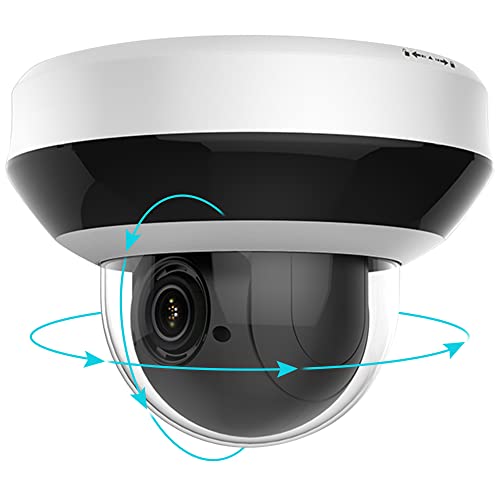
Anpviz 4.0MP(2560×1440) POE IP PTZ Dome Camera Compatible with Hikvision ,4X Optical, 16X Digital Zoom, H.265+ Outdoor Security Camera, Alarm, Pan/Tilt, SD Card Slot
Product Dimensions
5 x 4 x 4 inches
Item Weight
1.8 pounds
ASIN
B07T62VCY3
Item model number
PTZIP204WX4IR
Date First Available
June 24, 2019
Manufacturer
Anpviz
Test video – Anpviz 4.0MP(2560×1440) POE IP PTZ Dome Camera :
Product highlights :
【 4 Megapixel Resolution & Power over Ethernet (PoE) 】-This PTZ camera delivers 4.0 Megapixel resolution 2560×1440 @30fps, providing the level of detail needed for facial recognition and license plate identification. PoE allows IP (internet protocol) devices to receive power and data over existing LAN (local area network) cabling. This eliminates the need to install a separate power cable, simplifies installation, and lowers cabling costs. Compatible with Anpviz Wall mount bracket: B07D59VPGT
【 Pan/Tilt/Zoom 4X 2.8~12mm Lens 】- The 2.8 – 12 mm fixed lens on this camera offers 57° to 19° (Wide-Tele) and Diagonal field of view: 135° to 39° (Wide-Tele)° field of view to cover and protect a wider area. For superior around-the-clock surveillance, you can count on the camera’s 120 dB true Wide Dynamic Range (WDR) that gains better images in diverse lighting conditions, as well as 3D Digital Noise Reduction (3D-DNR) and True Day/Night (ICR).
【High-Speed 330° Pan & 90° Tilt】 The high-speed dome PTZ IP camera rotates up to 330° horizontally & 90° vertically at up to 100°/s and supports 300 preset positions. Cover every angle with just a single camera. Connect the PoE camera to an NVR with just a single network cable without messy wiring. Notice: There is no Tour or Auto Tracking feature of this PTZ Camera.
【 H.265+ Compression 】– Improves image quality and reduces bandwidth requirements. H.265+ format provides superior improvements in image quality and bandwidth. It also allows for faster, more fluid remote viewing, along with the ability to view more channels remotely. With H.265+ compression, you can store more information using fewer hard drives, which allows you to do more with less, and dramatically reduce file sizes with this latest video compression format.
【Multiple Working Solutions-Hikvision compatible 】Comptatible with Hikvision Software, App, IVMS4200 and Hik connect or GuardingVision APP. Plug and Play with Hikvision NVR and Anpviz NVR and 3rd Party NVRs, Highly recommend Anpviz 4K PoE NVR( Please Search B07Z9C1ZJQ, B07T829M5V) ; Works on ISpy, Blueiris, Milestone, software. Works with NAS, QNAS . This PTZ poe camera builts in SD Card Slot supports max Miro SD Card 256G Sstorage.
Questions & Answers – Anpviz 4.0MP(2560×1440) POE IP PTZ Dome Camera :
➕ What is the price of Anpviz 4.0MP(2560x1440) POE IP PTZ Dome Camera in Saudi Arabia ?
The price of Anpviz 4.0MP(2560×1440) POE IP PTZ Dome Camera in-store is SAR VAT.
➕ When Anpviz 4.0MP(2560x1440) POE IP PTZ Dome Camera was released ?
The release date was June 24, 2019.
➕ What is the price of Anpviz 4.0MP(2560x1440) POE IP PTZ Dome Camera cheap used ?
The price of Anpviz 4.0MP(2560×1440) POE IP PTZ Dome Camera used is SAR VAT.
➕ What are the main characteristics of Anpviz 4.0MP(2560x1440) POE IP PTZ Dome Camera ?
Special specifications :
【 4 Megapixel Resolution & Power over Ethernet (PoE) 】-This PTZ camera delivers 4.0 Megapixel resolution 2560×1440 @30fps, providing the level of detail needed for facial recognition and license plate identification. PoE allows IP (internet protocol) devices to receive power and data over existing LAN (local area network) cabling. This eliminates the need to install a separate power cable, simplifies installation, and lowers cabling costs. Compatible with Anpviz Wall mount bracket: B07D59VPGT
➕ Is it interesting to buy this product ?
The best people who can answer you are customers who have already bought and tested this product (See Customer Reviews). This product is rated 4.3 / 5 on Amazon.
➕ Where to buy Anpviz 4.0MP(2560x1440) POE IP PTZ Dome Camera in Saudi Arabia ?
Technical specifications – Anpviz 4.0MP(2560×1440) POE IP PTZ Dome Camera :
Recommended Uses For Product
Outdoor
Brand
Anpviz
Connectivity Technology
Wired
Special Feature
Portable
Indoor/Outdoor Usage
Outdoor
Purchase advice :
Warranty :
Check the duration of the warranty and also the faults and defects it covers. Is it complete or limited? and What is included in the warranty (parts, repairs or both)?
Shipping :
Is delivery offered? And how long does it take to get delivered (Delivery time)
Proof of purchase :
Does the shop give you an invoice ?
After-sales service :
Do they have an after-sales service to have information about the installation or operation (instructions for use). Also in case of problem, it is the seller who takes charge or you must contact the manufacturer or supplier yourself.
_____________________________
6 reviews for Anpviz 4.0MP(2560×1440) POE IP PTZ Dome Camera
Rated 5 out of 5
N. P (verified owner)–
Nice Camera, many options – I bought this to replace another branded POE, PTZ camera that was not up to par. This camera is much better in every way. The picture is wide enough for my usage, the picture is clear, the microphone works great, the PTZ functions flawlessly. This camera does NOT have a built-in speaker. It only has a built-in microphone. The night vision is good enough up to around 40-60ft. I connected this to my POE switch that is connected to my DVR/NVR. My DVR is a rebranded Hikvision. I did not have any issues connecting to this camera and updating the IP address to work with my system. I used the static IP listed in the instructions and connected to it via Chrome on my phone. I changed the admin password and updated the IP address to one that wasn’t being used on my network. Restarted the camera and reconnect to it with the new IP I gave it. I added the camera to the DVR, made some minor changes to the audio and picture for my preferences and made some set points within the PTZ settings. You can also use this camera without a DVR and view it from anywhere via several different apps, Guarding Vision, Hik-Connect, Hi-Look. I think the preferred app is Guarding Vision. You will need to follow the instructions to add the camera to the Guarding Vision Platform Access within the app, add your own encryption password for viewing and once that’s done you can view the camera from anywhere, as long as you have a Data or WiFi connection. You can also just use an IP address to connect to it from anywhere but that involves having some advanced networking skills. To many different scenarios to get into about that. You can set up motion alerts from the app, illegal login notifications and many other notifications at your own discretion. It has a slot for an SD card, I am not using it so I cannot say much about it besides it would record to it based on your recording preferences you set up in the app, all the time, motion only etc. If recording all the time, once it fills up, it would overwrite the oldest recording and continue recording, unless you tell it not too. Motion recording is the same way, once it fills up, it would overwrite the oldest recording. For those curious, ONVIF works great on this camera. I had no issues with mine. If you have a different DVR/NVR than Hik Vision, you need to verify that the version of ONVIF that comes with this camera will work with your DVR and/or NVR. I use this camera indoors to record while we are away from home. It is an indoor/outdoor camera but my usage needed it inside. I actually have mine set up to the smart home and it only comes on if the Alarm is set to Away Mode or if we manually turn it on. Its great for watching the dog while we are away too. For the $, this camera offers many options for you to choose from. I cannot speak for the longevity of it because I’ve only had it a couple of weeks but if something changes, I will update this review. Good Luck!
Rated 5 out of 5
O. H (verified owner)–
Nice cameras for the price. – Anpviz PTZIP204WX4IR
Rated 5 out of 5
N. H (verified owner)–
Not bad – I have two of these on my network that integrate with a sixteen channel NVR. These are HIK cameras, which is fine. You can block the camera network traffic from your firewall. Just place the camera subnet on its own subnet that is not routable to the internet.
Rated 5 out of 5
N. H (verified owner)–
Not bad – I have two of these on my network that integrate with a sixteen channel NVR. These are HIK cameras, which is fine. You can block the camera network traffic from your firewall. Just place the camera subnet on its own subnet that is not routable to the internet.
Rated 5 out of 5
O. H (verified owner)–
Nice cameras for the price. – Anpviz PTZIP204WX4IR
Rated 5 out of 5
N. P (verified owner)–
Nice Camera, many options – I bought this to replace another branded POE, PTZ camera that was not up to par. This camera is much better in every way. The picture is wide enough for my usage, the picture is clear, the microphone works great, the PTZ functions flawlessly. This camera does NOT have a built-in speaker. It only has a built-in microphone. The night vision is good enough up to around 40-60ft. I connected this to my POE switch that is connected to my DVR/NVR. My DVR is a rebranded Hikvision. I did not have any issues connecting to this camera and updating the IP address to work with my system. I used the static IP listed in the instructions and connected to it via Chrome on my phone. I changed the admin password and updated the IP address to one that wasn’t being used on my network. Restarted the camera and reconnect to it with the new IP I gave it. I added the camera to the DVR, made some minor changes to the audio and picture for my preferences and made some set points within the PTZ settings. You can also use this camera without a DVR and view it from anywhere via several different apps, Guarding Vision, Hik-Connect, Hi-Look. I think the preferred app is Guarding Vision. You will need to follow the instructions to add the camera to the Guarding Vision Platform Access within the app, add your own encryption password for viewing and once that’s done you can view the camera from anywhere, as long as you have a Data or WiFi connection. You can also just use an IP address to connect to it from anywhere but that involves having some advanced networking skills. To many different scenarios to get into about that. You can set up motion alerts from the app, illegal login notifications and many other notifications at your own discretion. It has a slot for an SD card, I am not using it so I cannot say much about it besides it would record to it based on your recording preferences you set up in the app, all the time, motion only etc. If recording all the time, once it fills up, it would overwrite the oldest recording and continue recording, unless you tell it not too. Motion recording is the same way, once it fills up, it would overwrite the oldest recording. For those curious, ONVIF works great on this camera. I had no issues with mine. If you have a different DVR/NVR than Hik Vision, you need to verify that the version of ONVIF that comes with this camera will work with your DVR and/or NVR. I use this camera indoors to record while we are away from home. It is an indoor/outdoor camera but my usage needed it inside. I actually have mine set up to the smart home and it only comes on if the Alarm is set to Away Mode or if we manually turn it on. Its great for watching the dog while we are away too. For the $, this camera offers many options for you to choose from. I cannot speak for the longevity of it because I’ve only had it a couple of weeks but if something changes, I will update this review. Good Luck!

![4K Digital Camera for Photography and Video [Autofocus & Anti-Shake] 48MP Vlogging Camera with SD Card](/wp-content/uploads/2023/05/51gL9sfh9NL-300x225.jpg)
N. P (verified owner) –
Nice Camera, many options – I bought this to replace another branded POE, PTZ camera that was not up to par. This camera is much better in every way. The picture is wide enough for my usage, the picture is clear, the microphone works great, the PTZ functions flawlessly. This camera does NOT have a built-in speaker. It only has a built-in microphone. The night vision is good enough up to around 40-60ft. I connected this to my POE switch that is connected to my DVR/NVR. My DVR is a rebranded Hikvision. I did not have any issues connecting to this camera and updating the IP address to work with my system. I used the static IP listed in the instructions and connected to it via Chrome on my phone. I changed the admin password and updated the IP address to one that wasn’t being used on my network. Restarted the camera and reconnect to it with the new IP I gave it. I added the camera to the DVR, made some minor changes to the audio and picture for my preferences and made some set points within the PTZ settings. You can also use this camera without a DVR and view it from anywhere via several different apps, Guarding Vision, Hik-Connect, Hi-Look. I think the preferred app is Guarding Vision. You will need to follow the instructions to add the camera to the Guarding Vision Platform Access within the app, add your own encryption password for viewing and once that’s done you can view the camera from anywhere, as long as you have a Data or WiFi connection. You can also just use an IP address to connect to it from anywhere but that involves having some advanced networking skills. To many different scenarios to get into about that. You can set up motion alerts from the app, illegal login notifications and many other notifications at your own discretion. It has a slot for an SD card, I am not using it so I cannot say much about it besides it would record to it based on your recording preferences you set up in the app, all the time, motion only etc. If recording all the time, once it fills up, it would overwrite the oldest recording and continue recording, unless you tell it not too. Motion recording is the same way, once it fills up, it would overwrite the oldest recording. For those curious, ONVIF works great on this camera. I had no issues with mine. If you have a different DVR/NVR than Hik Vision, you need to verify that the version of ONVIF that comes with this camera will work with your DVR and/or NVR. I use this camera indoors to record while we are away from home. It is an indoor/outdoor camera but my usage needed it inside. I actually have mine set up to the smart home and it only comes on if the Alarm is set to Away Mode or if we manually turn it on. Its great for watching the dog while we are away too. For the $, this camera offers many options for you to choose from. I cannot speak for the longevity of it because I’ve only had it a couple of weeks but if something changes, I will update this review. Good Luck!
O. H (verified owner) –
Nice cameras for the price. – Anpviz PTZIP204WX4IR
N. H (verified owner) –
Not bad – I have two of these on my network that integrate with a sixteen channel NVR. These are HIK cameras, which is fine. You can block the camera network traffic from your firewall. Just place the camera subnet on its own subnet that is not routable to the internet.
N. H (verified owner) –
Not bad – I have two of these on my network that integrate with a sixteen channel NVR. These are HIK cameras, which is fine. You can block the camera network traffic from your firewall. Just place the camera subnet on its own subnet that is not routable to the internet.
O. H (verified owner) –
Nice cameras for the price. – Anpviz PTZIP204WX4IR
N. P (verified owner) –
Nice Camera, many options – I bought this to replace another branded POE, PTZ camera that was not up to par. This camera is much better in every way. The picture is wide enough for my usage, the picture is clear, the microphone works great, the PTZ functions flawlessly. This camera does NOT have a built-in speaker. It only has a built-in microphone. The night vision is good enough up to around 40-60ft. I connected this to my POE switch that is connected to my DVR/NVR. My DVR is a rebranded Hikvision. I did not have any issues connecting to this camera and updating the IP address to work with my system. I used the static IP listed in the instructions and connected to it via Chrome on my phone. I changed the admin password and updated the IP address to one that wasn’t being used on my network. Restarted the camera and reconnect to it with the new IP I gave it. I added the camera to the DVR, made some minor changes to the audio and picture for my preferences and made some set points within the PTZ settings. You can also use this camera without a DVR and view it from anywhere via several different apps, Guarding Vision, Hik-Connect, Hi-Look. I think the preferred app is Guarding Vision. You will need to follow the instructions to add the camera to the Guarding Vision Platform Access within the app, add your own encryption password for viewing and once that’s done you can view the camera from anywhere, as long as you have a Data or WiFi connection. You can also just use an IP address to connect to it from anywhere but that involves having some advanced networking skills. To many different scenarios to get into about that. You can set up motion alerts from the app, illegal login notifications and many other notifications at your own discretion. It has a slot for an SD card, I am not using it so I cannot say much about it besides it would record to it based on your recording preferences you set up in the app, all the time, motion only etc. If recording all the time, once it fills up, it would overwrite the oldest recording and continue recording, unless you tell it not too. Motion recording is the same way, once it fills up, it would overwrite the oldest recording. For those curious, ONVIF works great on this camera. I had no issues with mine. If you have a different DVR/NVR than Hik Vision, you need to verify that the version of ONVIF that comes with this camera will work with your DVR and/or NVR. I use this camera indoors to record while we are away from home. It is an indoor/outdoor camera but my usage needed it inside. I actually have mine set up to the smart home and it only comes on if the Alarm is set to Away Mode or if we manually turn it on. Its great for watching the dog while we are away too. For the $, this camera offers many options for you to choose from. I cannot speak for the longevity of it because I’ve only had it a couple of weeks but if something changes, I will update this review. Good Luck!