Description
Amcrest UltraHD 5MP Outdoor POE Camera 2592 – Features & Prices in Saudi Arabia :
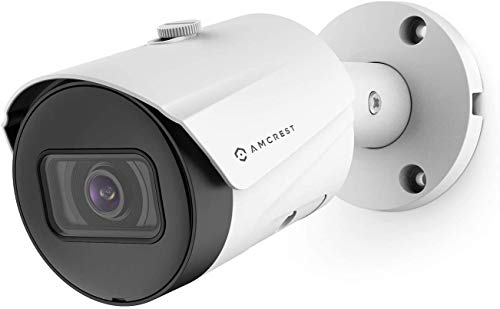
Amcrest UltraHD 5MP Outdoor POE Camera 2592 x 1944p Bullet IP Security Camera, Outdoor IP67 Waterproof, 103° Viewing Angle, 2.8mm Lens, 98.4ft Night Vision, 5-Megapixel, IP5M-B1186EW-28MM (White)
Test video – Amcrest UltraHD 5MP Outdoor POE Camera 2592 :
Product highlights :
5MP ULTRA-HD – Stunning 5-Megapixel 2592 x 1944p video resolution with enhanced low light capability on this POE outdoor camera utilizing a CMOS progressive image sensor and chipset. Wide 103° viewing angle allows you to cover more ground. Power Over Ethernet (POE camera) for easy installation (POE injector or switch required; not included, sold separately). Works with Alexa through AmcrestCloud.
SMARTER SECURITY – Adjust motion detection zones and sensitivity and receive email/phone alerts and review footage via the Amcrest View app. Playback and record professionally on a PC using the Amcrest Surveillance Pro software or Blue Iris Professional. Works with Amcrest Cloud remote video storage, Amcrest NVRs, and QNAP NAS, FTP, SeaMonkey, and Pale Moon Browsers, IE, Safari, Firefox 49.0, and Chrome with Amcrest Web View Extension
DAY OR NIGHT, RAIN OR SHINE – This outdoor POE IP camera features a heavy-duty metal weatherproof IP67 housing, as well as a built-in IR, LED and a low lux image sensor to achieve amazing low-light capability and night-vision up to 98.4 feet. Dual H.265/H.264 compression allows for maximum encryption with the latest technology as well as backward compatibility with legacy platforms. This camera is compatible with Amcrest NVR’s and has limited compatibility with third party NVR’s.
SECURE CLOUD VIDEO BACKUP – The optional Amcrest Cloud remote video storage subscription service allows you automatically store your videos off-site in a third-party location hosted and secured by Amazon AWS. This way if something happens to your local PC/NVR/NAS, the footage will be safely recorded in a secure off-site location and accessible to you through a web-based Flash interface for PC (Chrome/Firefox/Safari/Edge) and AmcrestCloud smartphone app.
SIMPLE, RELIABLE, SECURE – This Amcrest POE camera features a secure SSL/HTTPS connection, FCC and CE certificates and receives regular firmware updates. At Amcrest, we want to ensure the safety of our customers, their loved ones, homes and businesses. You’ll receive a full 1-year US Warranty and Lifetime Support provided directly from Amcrest. Compatible with the following Amcrest Junction Boxes, ASIN: B0711CNYDW, B08HJQB863, & B07195BN8X
Questions & Answers – Amcrest UltraHD 5MP Outdoor POE Camera 2592 :
➕ What is the price of Amcrest UltraHD 5MP Outdoor POE Camera 2592 in Saudi Arabia ?
The price of Amcrest UltraHD 5MP Outdoor POE Camera 2592 in-store is 220 SAR VAT.
➕ When Amcrest UltraHD 5MP Outdoor POE Camera 2592 was released ?
The release date was December 11, 2019.
➕ What is the price of Amcrest UltraHD 5MP Outdoor POE Camera 2592 cheap used ?
The price of Amcrest UltraHD 5MP Outdoor POE Camera 2592 used is 150 SAR VAT.
➕ What are the main characteristics of Amcrest UltraHD 5MP Outdoor POE Camera 2592 ?
Special specifications :
5MP ULTRA-HD – Stunning 5-Megapixel 2592 x 1944p video resolution with enhanced low light capability on this POE outdoor camera utilizing a CMOS progressive image sensor and chipset. Wide 103° viewing angle allows you to cover more ground. Power Over Ethernet (POE camera) for easy installation (POE injector or switch required; not included, sold separately). Works with Alexa through AmcrestCloud.
➕ Is it interesting to buy this product ?
The best people who can answer you are customers who have already bought and tested
this product (
See Customer Reviews). This product is rated 4.3 / 5
on Amazon.
➕ Where to buy Amcrest UltraHD 5MP Outdoor POE Camera 2592 in Saudi Arabia ?
Mall, Supermarkets, Amazon, Specialized stores, ….
Technical specifications – Amcrest UltraHD 5MP Outdoor POE Camera 2592 :
Recommended Uses For Product
Portable, Night Vision, Image Sensor, Motion Sensor
Purchase advice :
-
Warranty :
Check the duration of the warranty and also the faults and defects it covers. Is it complete or limited? and What is included in the warranty (parts, repairs or both)?
-
Shipping :
Is delivery offered? And how long does it take to get delivered (Delivery time)
-
Proof of purchase :
Does the shop give you an invoice ?
-
After-sales service :
Do they have an after-sales service to have information about the installation or operation (instructions for use). Also in case of problem, it is the seller who takes charge or you must contact the manufacturer or supplier yourself.
_____________________________

P. P (verified owner) –
Surprisingly good low light performance. – Needed a single IP Camera for a special project. Camera works great, no issues from being in the elements outside and very good low light performance. Color image is available until it is almost fully dark then is switches over the Black and White mode.
J. J (verified owner) –
I really like this camera – This camera makes the 8th Amcrest. All of them have been outdoor types. This one, just like the rest, was very easy to install and program into my system. I really like the night vision. Some of the camera, I don’t even use the IR light. The street light presents me with a much better scene. Of course, day scenes, are beautiful. My oldest Amcrest is over 2 years old. So far I have not had a problem with any of them. We have had power outages, a SUPER cold winter a couple of years ago and brutal heat in summer. They just keep working. As my ancient Logitech cameras go out inside the house, I will replace them with Amcrest too.
J. J (verified owner) –
I really like this camera – This camera makes the 8th Amcrest. All of them have been outdoor types. This one, just like the rest, was very easy to install and program into my system. I really like the night vision. Some of the camera, I don’t even use the IR light. The street light presents me with a much better scene. Of course, day scenes, are beautiful. My oldest Amcrest is over 2 years old. So far I have not had a problem with any of them. We have had power outages, a SUPER cold winter a couple of years ago and brutal heat in summer. They just keep working. As my ancient Logitech cameras go out inside the house, I will replace them with Amcrest too.
K. J (verified owner) –
Great DIY Camera – I’ve trusted Amcrest for several years already, and was not one bit surprised to find their line of IP cameras operate nicely. I’ve had nothing but luck so far with the 7 of these that I have purchased. If you know anything about accessing the web UI for most IP cameras, these are a simple setup. Im using them with BlueIris recording 24/7, everything has been great!
B. K (verified owner) –
Great camera works good with Blue Iris – needs microphone – Overall pretty happy with this camera. I replaced a Reolink camera with this one, and this one excels in the night vision, and overall has a wider depth of view which I needed for this application (although in some instances in my setup I prefer the narrower FOV on the Reolink). It also has the ability to properly set the key frame which makes recording/playback behave better in Blue Iris. My only dislike is the bullet camera style of the Amcrest does not have a microphone. I knew this going in, but would be nice if it were added, as I did not want the turret style which does have it.
K. J (verified owner) –
Great DIY Camera – I’ve trusted Amcrest for several years already, and was not one bit surprised to find their line of IP cameras operate nicely. I’ve had nothing but luck so far with the 7 of these that I have purchased. If you know anything about accessing the web UI for most IP cameras, these are a simple setup. Im using them with BlueIris recording 24/7, everything has been great!
N. A (verified owner) –
Beware of Smart codec – I was having problems getting this to work smoothly on Synology Surveillance station monitor center timeline. Issues included severe lag when skipping through events (mostly for 2x and 4x speed, but also some at 1x speed). Also, the timeline motion tag and the actual motion were misaligned. Sometimes, I would press Next Event and the timeline just would not advance no matter how many times I pressed it. After tons of various adjustments, it turns out that I somehow had smart codec enabled in the Amcrest camera (accessible via web configuration). Turned smart codec off and it was an instant fix. This camera does really well using H265 and it seems to be a little more clear for fine detail than my 4MP Amcrest cameras even when running down at 2688×1536. One thing to be aware of though is the max resolution of this camera. 2592 x 1944p is more of a square picture. If you are trying to cover more left/right, then the 1944p part isn’t really doing much for you.
N. G (verified owner) –
UPDATE: Best Bang for Your Buck – UPDATE2: I have upgraded my review to 4 stars based on having them in operation for a month. I am thus far very happy with the performance of these cameras, the image width, depth of field and clarity earn high marks for a reasonably priced camera. After I discovered how to manipulate the mount so I can point the camera where I wanted things went smoothly. Originally I thought the lens hood was too short but it seems to work well enough although I still think they should lengthen the adjustment another half inch. My install was very detailed and time consuming because I wanted to make this clean and maintenance free, I used quality solid copper cabling and PoE switch, made sure there was no exposed wires and am testing out open source NVR software to complete the setup. Amcrest has a good tool for installing or configuring the cameras (Amcrest IPconfig) but I would like to see them update their surveillance software and include various methods for configuring access via the web in addition to any of the paid subscriptions model they might have or come up with. In short this project has been fun, I still have 2 more cameras to install but am sure that will go just as smooth as the others, just be sure to use good wire and PoE switch. I posted a pic to show how it looks installed, they arent obvious at first glance, it took my neighbor a while to notice they were there and they werent too pleased which was the cherry on the cake for me.
P. P (verified owner) –
Surprisingly good low light performance. – Needed a single IP Camera for a special project. Camera works great, no issues from being in the elements outside and very good low light performance. Color image is available until it is almost fully dark then is switches over the Black and White mode.
N. G (verified owner) –
UPDATE: Best Bang for Your Buck – UPDATE2: I have upgraded my review to 4 stars based on having them in operation for a month. I am thus far very happy with the performance of these cameras, the image width, depth of field and clarity earn high marks for a reasonably priced camera. After I discovered how to manipulate the mount so I can point the camera where I wanted things went smoothly. Originally I thought the lens hood was too short but it seems to work well enough although I still think they should lengthen the adjustment another half inch. My install was very detailed and time consuming because I wanted to make this clean and maintenance free, I used quality solid copper cabling and PoE switch, made sure there was no exposed wires and am testing out open source NVR software to complete the setup. Amcrest has a good tool for installing or configuring the cameras (Amcrest IPconfig) but I would like to see them update their surveillance software and include various methods for configuring access via the web in addition to any of the paid subscriptions model they might have or come up with. In short this project has been fun, I still have 2 more cameras to install but am sure that will go just as smooth as the others, just be sure to use good wire and PoE switch. I posted a pic to show how it looks installed, they arent obvious at first glance, it took my neighbor a while to notice they were there and they werent too pleased which was the cherry on the cake for me.
B. K (verified owner) –
Great camera works good with Blue Iris – needs microphone – Overall pretty happy with this camera. I replaced a Reolink camera with this one, and this one excels in the night vision, and overall has a wider depth of view which I needed for this application (although in some instances in my setup I prefer the narrower FOV on the Reolink). It also has the ability to properly set the key frame which makes recording/playback behave better in Blue Iris. My only dislike is the bullet camera style of the Amcrest does not have a microphone. I knew this going in, but would be nice if it were added, as I did not want the turret style which does have it.
N. A (verified owner) –
Beware of Smart codec – I was having problems getting this to work smoothly on Synology Surveillance station monitor center timeline. Issues included severe lag when skipping through events (mostly for 2x and 4x speed, but also some at 1x speed). Also, the timeline motion tag and the actual motion were misaligned. Sometimes, I would press Next Event and the timeline just would not advance no matter how many times I pressed it. After tons of various adjustments, it turns out that I somehow had smart codec enabled in the Amcrest camera (accessible via web configuration). Turned smart codec off and it was an instant fix. This camera does really well using H265 and it seems to be a little more clear for fine detail than my 4MP Amcrest cameras even when running down at 2688×1536. One thing to be aware of though is the max resolution of this camera. 2592 x 1944p is more of a square picture. If you are trying to cover more left/right, then the 1944p part isn’t really doing much for you.